Microsoft has officially announced that Windows 10 support will end on October 14, 2025.
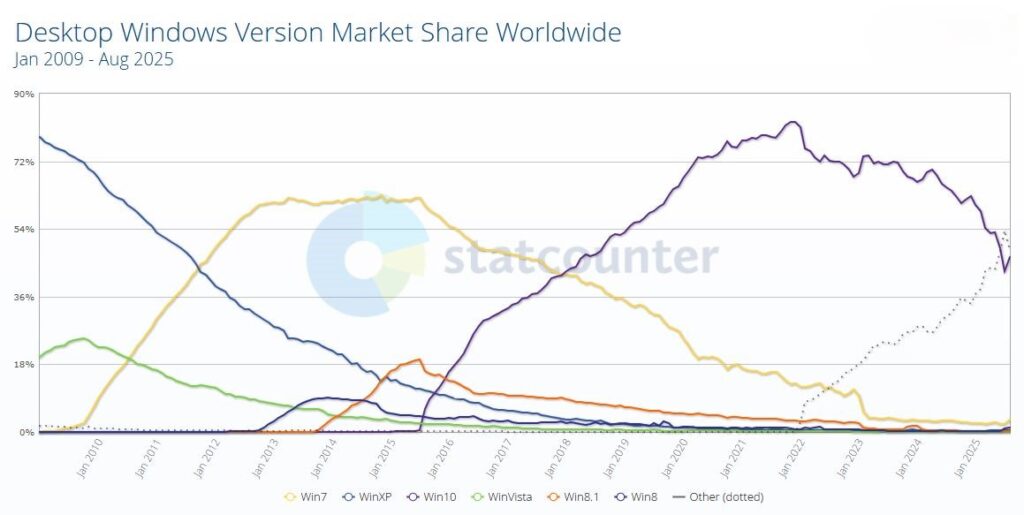
As technology evolves, so do the systems we rely on. Windows 10, one of the most widely used operating systems, securing 58.83% share of the worldwide market, will reach its end of support. This marks a significant shift for millions of users worldwide.
In this post, we’ll explore what this means, why it’s happening, and what steps you should take to prepare.
📌Key Points About Windows 10 End of Life
- End of Support Date: October 14, 2025
- No More Security Updates: After this date, Windows 10 will no longer receive security patches, making devices more vulnerable to threats.
- No Bug Fixes or Features: Microsoft will stop releasing new features and bug fixes.
- Mainstream Support Already Ended: Windows 10 is currently in extended support, which only includes security updates until 2025.
- Last Version: Windows 10 version 22H2 is the final release. No more major updates will come.
💻What This Means for Users
- Security Risks: Using Windows 10 after October 2025 will expose you to cyberattacks and malware. Without updates, your system will be vulnerable to new threats, malware, and exploits. Software Compatibility: New applications may not support Windows 10, leading to compatibility issues. Performance and Features: Microsoft is focusing on Windows 11 and future systems, which offer improved performance, security, and modern features.
- Software Compatibility Issues: Future apps and software may not support Windows 10. Any lingering glitches or stability issues within the Windows 10 system will never be fixed. Over time, new software and hardware drivers may stop being compatible with an outdated OS, making it harder to run new applications or use new peripherals.
- Business Compliance: Companies may face compliance issues if they continue running unsupported operating systems.
- Reduced Performance: Without updates, system stability and performance may decline over time. This could leave your system exposed to risks and potentially unreliable for critical tasks.
🔄Upgrade Options
- Windows 11: Microsoft encourages upgrading to Windows 11 for continued support, security, and new features. It is Microsoft’s latest operating system, offering enhanced security, a modern interface, and better performance. Check if your device meets Windows 11’s system requirements (e.g., TPM 2.0, Secure Boot, and compatible hardware). If eligible, you can upgrade for free before the end-of-support date.
- Check Compatibility: First, see if your current PC can run it. The main requirement is a relatively modern CPU (8th Gen Intel or AMD Ryzen 2000 series and newer) and TPM 2.0 (a security chip). You can download and run the PC Health Check app from Microsoft to verify.
- It’s (Usually) Free: If your device is compatible and has a genuine Windows 10 license, the upgrade to Windows 11 is free.
- Familiar Feel: Windows 11 refines the Windows 10 experience with a new centered Start Menu and improved performance and security features built-in.
- Hardware Requirements: Some older PCs may not meet Windows 11’s minimum system requirements (TPM 2.0, Secure Boot, newer processors).
- Buy a New PC: If your device is not compatible, you may need to purchase a new computer with Windows 11 pre-installed. Consider investing in a new PC that meets the requirements. New devices come optimized for Windows 11 and often include better performance and battery life.
- Other Operating Systems: For advanced users, Linux-based systems can be an alternative. Switch to other operating systems like macOS or Linux if Windows 11 isn’t an option. Linux distributions (e.g., Ubuntu, Linux Mint) are free and can run on older hardware.
📝What You Should Do Now
- ✅ Check if your PC is compatible with Windows 11 using Microsoft’s PC Health Check tool.
- ✅ Start planning your migration strategy if you manage multiple devices.
- ✅ Backup your files and consider a fresh installation for better performance.
- ✅ Explore extended security update (ESU) options if offered by Microsoft for businesses.
- ✅ Budget for upgrades or new hardware before the 2025 deadline.
Final Thoughts
The countdown has started: Windows 10 will officially retire in October 2025. Don’t wait until the last minute—start preparing now to ensure a smooth transition and keep your systems secure.
The end of Windows 10 support is a reminder of how quickly technology evolves. While it’s been a reliable operating system for a decade, it’s time to start planning for the future. Whether you upgrade to Windows 11, switch to a new device, or explore alternative operating systems, taking action now will keep your digital life secure and up to date. Have you started preparing for the end of Windows 10? Share your thoughts or questions in the comments below!
For more information: How to prepare for Windows 10 end of support by moving to Windows 11 today